Two-factor authentication (2FA)—also called multifactor authentication (MFA)—means a stolen password alone should not be enough to open your account. The usual second factor for consumers is either a text message code or a code from an authenticator app. Both help. They are not equal.
This guide sticks to what official guidance actually says, without vendor scare ads.
What 2FA is doing
CISA’s training module Why a Strong Password isn’t Enough explains the problem: attackers phish passwords, buy leaked credentials, and try them on other sites. MFA adds another check—something you have (a phone or key) or something you are (biometrics)—so a password leak does not equal instant account takeover.
Any MFA beats password-only. The type still matters.
CISA’s strength ranking (weakest → stronger)
On that same page, CISA ranks common MFA options from strongest to weakest. Condensed for consumers:
- Strongest: physical tokens with FIDO authentication
- Physical tokens more generally
- Biometric authentication
- Software token (authenticator apps that generate codes)
- Email one-time passcode
- Weakest: SMS one-time passcode
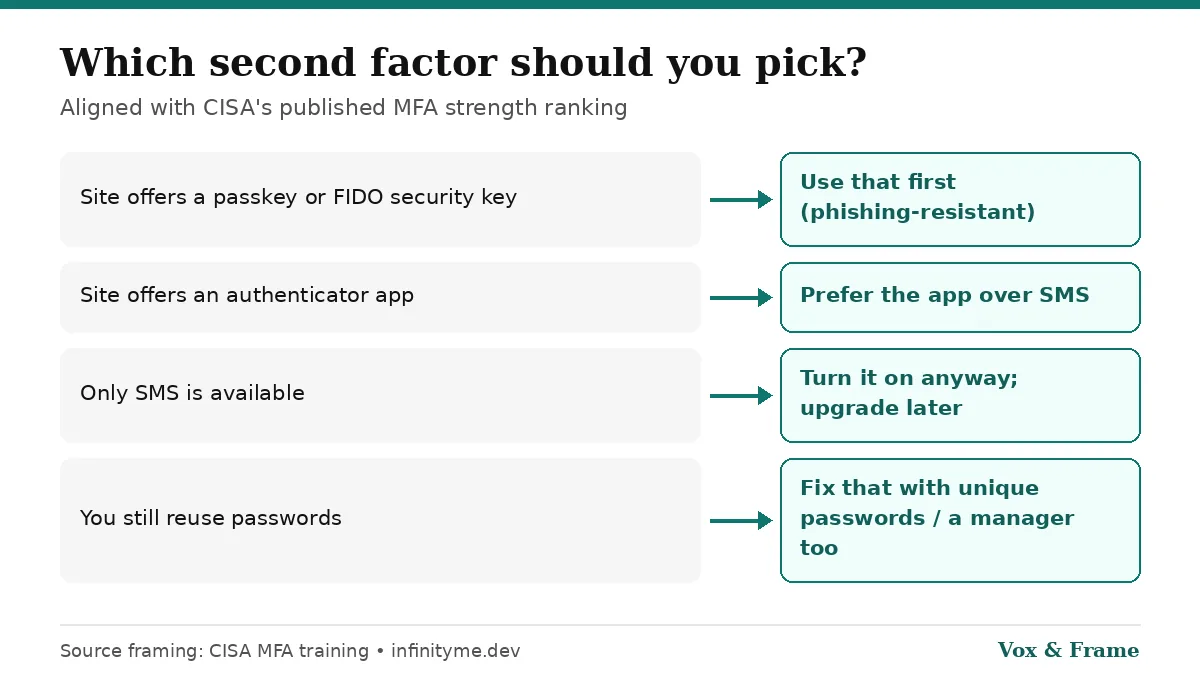
So: SMS is better than nothing, and an authenticator app is a clear upgrade when the site offers it. Passkeys and FIDO security keys sit at the top of that ladder for phishing resistance. We cover passkeys in How Passkeys Work and Passkeys vs Passwords: Why Phishing Stops Working.
Why text-message codes are limited
1. SIM swap and number takeover
If someone convinces your mobile carrier to move your number to a SIM or eSIM they control, your SMS codes can arrive on their phone. The FBI’s Internet Crime Complaint Center has warned that social-engineering attacks, including SIM-swap style number takeovers, are used to intercept verification codes (IC3 PSA, April 11, 2024). Protection habits include a carrier account PIN/passcode and never sharing one-time codes with callers who claim to be “support.”
2. Phishing still works on codes you type
A fake login page can ask for your password and the six-digit SMS code, then replay both to the real site in real time. That is why phishing-resistant options (passkeys / FIDO) matter for high-value accounts. CISA’s Implementing Phishing-Resistant MFA fact sheet frames FIDO/WebAuthn as the phishing-resistant path for organizations; consumer passkeys use the same underlying idea.
3. The code depends on the phone network
No signal, number porting delays, or recycled numbers can block or confuse SMS delivery. Authenticator apps generate time-based codes on the device and do not need a text to arrive.
What an authenticator app changes
An authenticator app (examples named in CISA’s training include Google Authenticator and Microsoft Authenticator) stores a secret on your phone and shows a rotating code. Typical benefits versus SMS:
- Codes are not sent over SMS, so classic SIM swap does not intercept them the same way
- Works offline once set up
- One app can cover many accounts
Setup tips that prevent lockouts:
- Save backup/recovery codes the site shows you (print or store offline)
- Prefer an app that supports encrypted backup if you change phones often
- Turn on the app method before removing SMS, when the site allows both
Practical recommendations
| Account type | Prefer | Acceptable fallback |
|---|---|---|
| Email (the keys to password resets) | Passkey or authenticator app | SMS only if nothing else is offered |
| Banking / brokerage | Passkey, security key, or app | SMS if that is all the bank offers—still enable it |
| Social / shopping | Authenticator or passkey | SMS better than off |
| High-risk / public figure | FIDO security key + passkeys | Avoid SMS as primary |
Also:
- Use unique passwords (a password manager helps; see CISA’s Use Strong Passwords)
- After a breach, change reused passwords and check Have I Been Pwned — full checklist: email leaked / data breach guide
- Consider a free credit freeze if sensitive personal data leaked
Bottom line
- Keep 2FA on. Turning it off to “avoid hassle” is worse than using SMS.
- Prefer an authenticator app (or passkey) over SMS when you have the choice—that matches CISA’s published ranking.
- Treat SMS as a starter layer, not the end state for email and money accounts.
- Passkeys close the phishing gap that typed codes still leave open.
Sources
Frequently asked questions
Is SMS 2FA better than no 2FA?
+
Yes. CISA’s multifactor authentication training says any form of MFA is better than none. Text-message codes are simply ranked as the weakest common option compared with authenticator apps, biometrics, and FIDO security keys or passkeys.
Why is SMS 2FA considered weak?
+
The code travels through the phone network. Attackers can try to take over your number (SIM swap), intercept messages, or trick you into reading a code aloud on a phishing page. An authenticator app generates codes on your device without relying on SMS.
Should I turn off SMS 2FA completely?
+
Only after a stronger method works on that account. Prefer an authenticator app, push approval, security key, or passkey. Keep SMS as a backup only if the service still requires a phone number and you understand the risk.
What is stronger than an authenticator app?
+
CISA lists physical tokens with FIDO authentication among the strongest options. Passkeys (device-bound or synced) use the same phishing-resistant WebAuthn/FIDO family. See our passkeys guides for the consumer version of that idea.