A credit freeze (also called a security freeze) is one of the strongest free steps you can take after a data breach, a lost Social Security number, or any time you want to make it harder for someone to open new credit in your name. It is free, it is temporary only when you lift it, and you have to do it at each of the three major U.S. credit bureaus.
If you just got a breach notice for your email, start with our checklist: Has Your Email Been Leaked? What to Do After a Data Breach. This page focuses on the freeze itself.
What a credit freeze does
According to USA.gov, a security freeze restricts access to your credit report. Creditors generally cannot pull that report to approve a new credit account in your name until you lift the freeze.
That helps against new fraudulent cards or loans. It does not:
- Close accounts you already have
- Stop existing creditors from seeing your file
- Stop every kind of identity misuse (tax, medical, or account takeover of an existing login still need other steps)
- Replace strong passwords, passkeys, or two-factor authentication on your email and bank
Equifax describes the same idea on its Security Freeze page: the freeze restricts access to your Equifax report for opening credit, and you lift it when you want to apply.
Freeze vs fraud alert (short version)
| Credit / security freeze | Initial fraud alert | |
|---|---|---|
| Cost | Free | Free |
| What it does | Blocks most new-credit access to that bureau’s report until you lift it | Asks businesses to verify it is really you before opening new credit |
| How to place | Contact each bureau | Contact one bureau; it notifies the other two |
| Duration | Until you remove or temporarily lift it | Typically one year (renewable); longer extended alerts exist in some identity-theft cases |
Many people place a freeze for everyday protection and add a fraud alert when they already suspect fraud. If someone already opened accounts in your name, also use IdentityTheft.gov for a recovery plan.
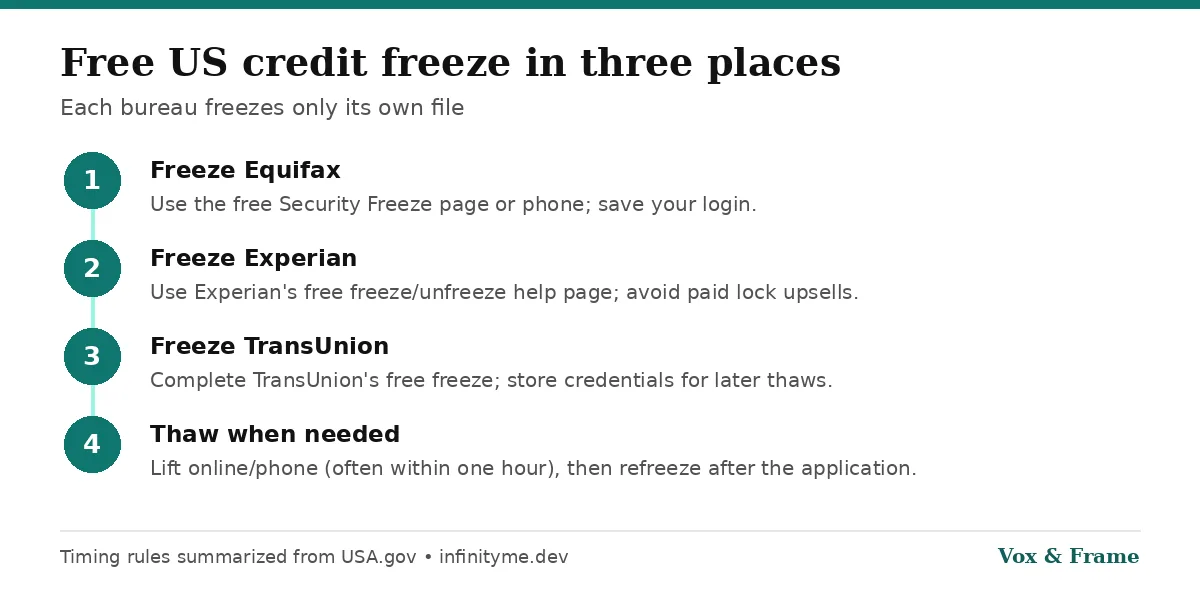
Step 1: Freeze Equifax (free)
- Go to Equifax’s Security Freeze page.
- Create or sign in to a myEquifax account (you must be 18 to create one online).
- Place the security freeze. Equifax states that placing, temporarily lifting, and removing a freeze is free.
- Save your login. You will need it to thaw the freeze later.
Phone option listed by Equifax: (888) 298-0045. Phone and mail options also exist for minors and other special cases via Equifax Customer Care forms.
Step 2: Freeze Experian (free)
- Go to Experian’s Freeze or Unfreeze Your Credit File for Free page.
- Create or sign in to your Experian account and choose the free security freeze (not a paid “lock” upsell if one appears).
- Confirm the freeze and store your account credentials securely.
Experian’s help line commonly listed for credit help is 888-EXPERIAN (888-397-3742) (also referenced on IdentityTheft.gov recovery steps).
Step 3: Freeze TransUnion (free)
- Use TransUnion’s free security freeze flow (linked from USA.gov’s credit freeze page under the three agencies). The consumer freeze URL is typically transunion.com/credit-freeze.
- Create or sign in, place the freeze, and save your login or PIN.
Do all three. Freezing only one bureau leaves the other two files open for new-credit pulls.
How long it takes
From USA.gov (last updated November 13, 2025 on the page we checked):
- Freeze online or by phone: agency must freeze within one business day
- Freeze by mail: within three business days
- Lift online or by phone: within one hour
- Lift by mail: within three business days
Plan ahead before a mortgage, auto loan, new card, or apartment application that needs a credit check.
How to lift (thaw) a freeze when you need credit
- Sign in at the bureau the lender will use (ask the lender which one if you can).
- Choose a temporary lift for a date range, or a permanent removal if you no longer want the freeze.
- Refreeze afterward if you still want the protection.
You may need to thaw more than one bureau if several lenders pull different files.
After you freeze: still watch your credit
A freeze is prevention for new credit, not a substitute for monitoring:
- Get free weekly reports at AnnualCreditReport.com
- Watch bank and card statements
- Harden logins: unique passwords or a password manager, two-factor authentication, and passkeys where available
- If fraud already happened, file at IdentityTheft.gov
Quick recap
- A US security freeze is free at Equifax, Experian and TransUnion.
- You must freeze each bureau separately.
- Online/phone freezes take effect within one business day; thaws within one hour (per USA.gov).
- Lift temporarily before you apply for new credit, then freeze again.
- Pair the freeze with password hygiene and breach follow-up—not instead of them.
Sources
Frequently asked questions
Does a credit freeze cost money?
+
No. Placing, temporarily lifting, and removing a security freeze is free at Equifax, Experian and TransUnion. If a page asks you to pay, you are likely looking at a paid credit-lock product, not the free security freeze.
Does a credit freeze hurt my credit score?
+
A freeze restricts access to your credit report for new credit. It is not a negative mark on your score. You still need to lift it (temporarily or permanently) before a lender can pull your report for a new application.
Do I have to freeze all three bureaus?
+
Yes, if you want broad protection. Each bureau freezes only its own file. Contact Equifax, Experian and TransUnion separately.
How fast does a freeze take effect?
+
According to USA.gov, online or phone freeze requests must take effect within one business day, and mail requests within three business days. Online or phone thaw requests must be lifted within one hour.
What is the difference between a freeze and a fraud alert?
+
A freeze blocks most new-credit access to your report until you lift it. An initial fraud alert lasts one year, can be placed through one bureau (which notifies the others), and asks businesses to verify your identity before opening new credit—it does not lock the report the same way.