Free Wi-Fi at a cafe, airport or hotel: is it actually dangerous? The honest answer is it's much safer than it used to be, but a few real traps are worth knowing. The 90-second video above covers the essentials. This article adds the details and links to official advice from the FTC and CISA.
The good news: HTTPS is everywhere
Years ago, many websites sent data unencrypted, so anyone on the same open network could snoop on it. That has changed. In the FTC's words: "Today, most websites do use encryption to protect your information. Because of the widespread use of encryption, connecting through a public Wi-Fi network is usually safe." (FTC)
HTTPS encrypts what travels between your device and the website, so other people on the cafe network can't read your passwords or messages on those sites. Look for https or the padlock in the address bar. Most mobile apps encrypt their traffic too, though, as the FTC notes, that's harder to check.
One important caveat from the FTC: scammers also make encrypted websites. The padlock means the connection is private, not that the site is honest.
The risks that still matter
1. Evil twin hotspots
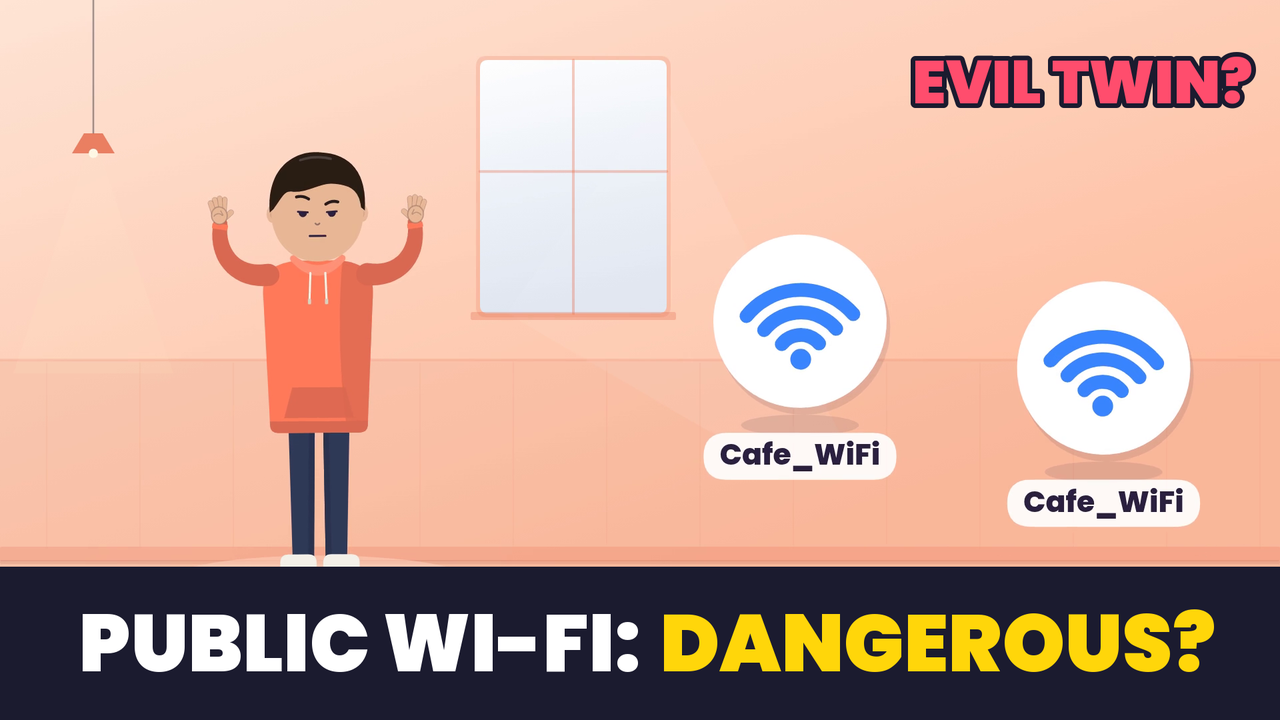
The biggest real risk is a fake hotspot with the same name as the real one. If you join it, the attacker sits in the middle of your connection and can try to push you to fake pages. CISA's public Wi-Fi tip card warns that "cybercriminals can easily create a similarly named network hoping that users will overlook which network is the legitimate one" and advises confirming the network name and login procedure with staff (CISA tip card).
Rule of thumb: if you see two networks with the same or a very similar name, ask staff which one is real.
2. Fake captive portals (login pages)
Many public networks show a "sign in to Wi-Fi" page. A fake hotspot can show a fake one that asks for your email password, social login or card details. A real cafe portal might ask you to accept terms or enter a room number or code; it should not need your email account password. If a Wi-Fi login page asks for something that feels too personal, close it.
3. Clicking through certificate warnings
If your browser says "Your connection is not private" or shows a certificate error on a site you normally use, that's a sign something may be intercepting the connection. Don't click "Proceed anyway." Disconnect and use mobile data instead.
4. Auto-join
Phones and laptops remember networks and may rejoin anything with a familiar name, which is exactly what an evil twin relies on. CISA recommends that you "turn off features on your computer or mobile devices that allow you to connect automatically to Wi-Fi" and log out when you're done (CISA tip card).
5. AirDrop and file sharing
On a public network, the people around you are the risk, not just the router. Set AirDrop (or Quick Share on Android) to Contacts Only or off, and turn off file sharing on laptops. CISA's guidance on wireless networks says to allow file sharing only on home or work networks, "never on public networks" (CISA: Securing Wireless Networks).
6. Outdated devices
An unpatched phone or laptop is a bigger risk than the Wi-Fi itself. Both the FTC and CISA advise keeping your operating system, browser and apps updated; CISA notes updates keep criminals from taking advantage of known vulnerabilities (CISA tip card, FTC).
Quick public Wi-Fi checklist
- Verify the network name with staff before connecting.
- Turn off auto-join for public networks.
- Forget the network when you leave.
- Set AirDrop / file sharing to contacts only or off.
- Update your OS and apps, and turn on automatic updates.
- Never click through certificate warnings.
- Use your phone's hotspot for banking and other sensitive tasks. CISA says your own mobile connection is "generally more secure" than public Wi-Fi.
- A VPN is an extra layer, not magic. It encrypts traffic to the VPN provider, but it won't stop you from typing a password into a phishing page, and you're trusting the VPN company with your traffic.
Where passkeys fit in
Most real-world account theft on public Wi-Fi comes back to fake login pages, and passwords are what they steal. Passkeys help here: a passkey is tied to the real website, so your device won't use it on a look-alike page. See our explainer: Passkeys vs Passwords: Why Phishing Stops Working.
Watch the Short
Prefer vertical? Here's the 35-second version: Is Free Cafe Wi-Fi Dangerous? The Real Trap.
Bottom line
Public Wi-Fi isn't the danger it was a decade ago, because HTTPS protects most of what you do. What still matters is which network you join, what you type into login pages, the warnings you ignore and how up to date your device is. Check the network name, turn off auto-join, keep your phone updated, and use your hotspot for banking.
Sources: FTC: Are Public Wi-Fi Networks Safe? What You Need To Know; CISA: Best Practices for Using Public Wi-Fi Tip Card; CISA: Securing Wireless Networks. Checked October 27, 2026.
Make videos about this: the video above uses an AI narrator. If you want to make your own tech explainers, compare tools in best AI voice generators for YouTube and check costs in ElevenLabs pricing explained.
Frequently asked questions
Is it safe to use public Wi-Fi in 2026?
+
Usually, yes, for everyday browsing. The FTC notes that most websites now use encryption (HTTPS), so connecting through a public Wi-Fi network is usually safe. The remaining risks come from fake networks, fake login pages and your own device settings.
What is an evil twin Wi-Fi network?
+
A fake hotspot that copies the name of a real one, such as the cafe's network. CISA warns that cybercriminals can easily create a similarly named network, so confirm the exact network name with staff before you connect.
Should I do online banking on public Wi-Fi?
+
CISA advises avoiding banking, shopping and other sensitive activity on public Wi-Fi and says your own mobile connection is generally more secure. Using your phone's hotspot for banking is a simple habit.
Do I need a VPN on public Wi-Fi?
+
A VPN adds an extra layer by encrypting traffic between your device and the VPN provider, but it is not magic: it won't stop you from typing a password into a phishing page or fix an outdated device.