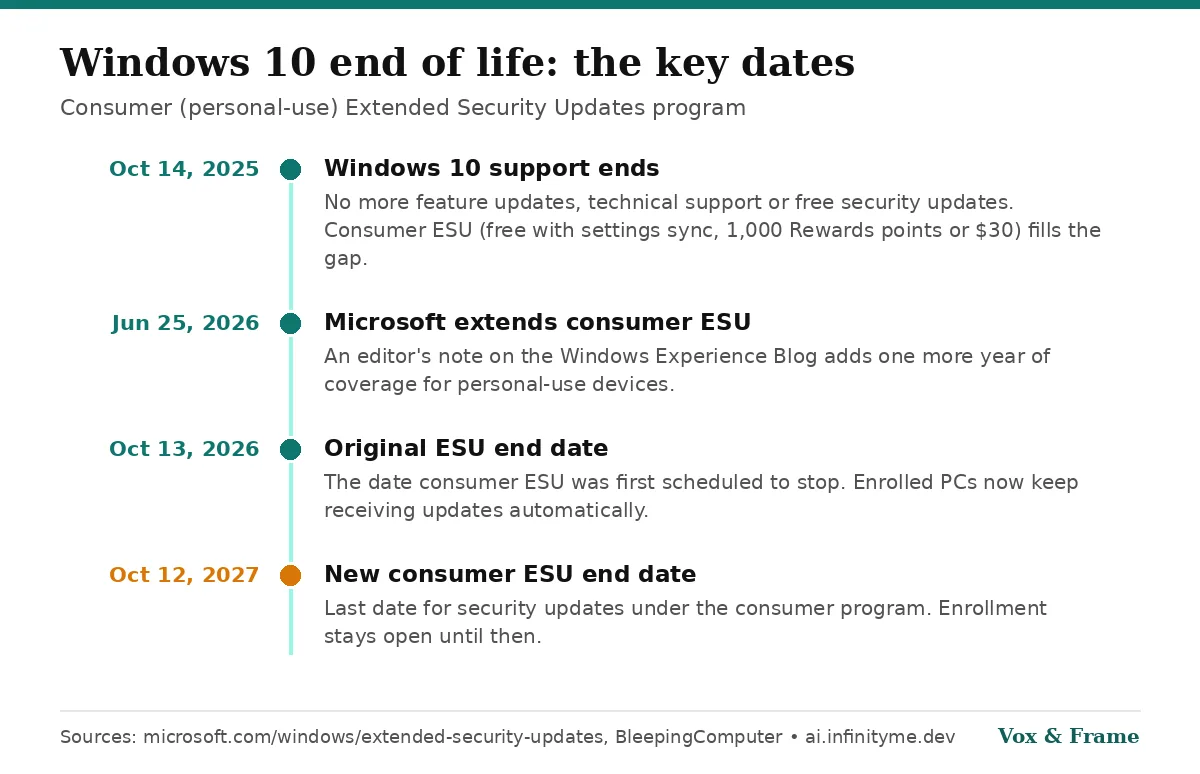
If you are still running Windows 10, the most important tech date of this month quietly stopped being a deadline. The consumer Extended Security Updates (ESU) program was originally set to end on October 13, 2026. Microsoft has extended it by a full year, to October 12, 2027 (Microsoft).
What changed
Windows 10 reached end of support on October 14, 2025. Since then, regular Windows 10 PCs get no feature updates, no technical support and no security updates unless they are enrolled in ESU (BleepingComputer).
The extension did not come with a big announcement. As BleepingComputer reported, it appeared as an editor's note dated June 25, 2026 on a Windows Experience Blog post and in Microsoft's ESU documentation. Microsoft's statement to the site: "We understand that moving to a new PC can take time."
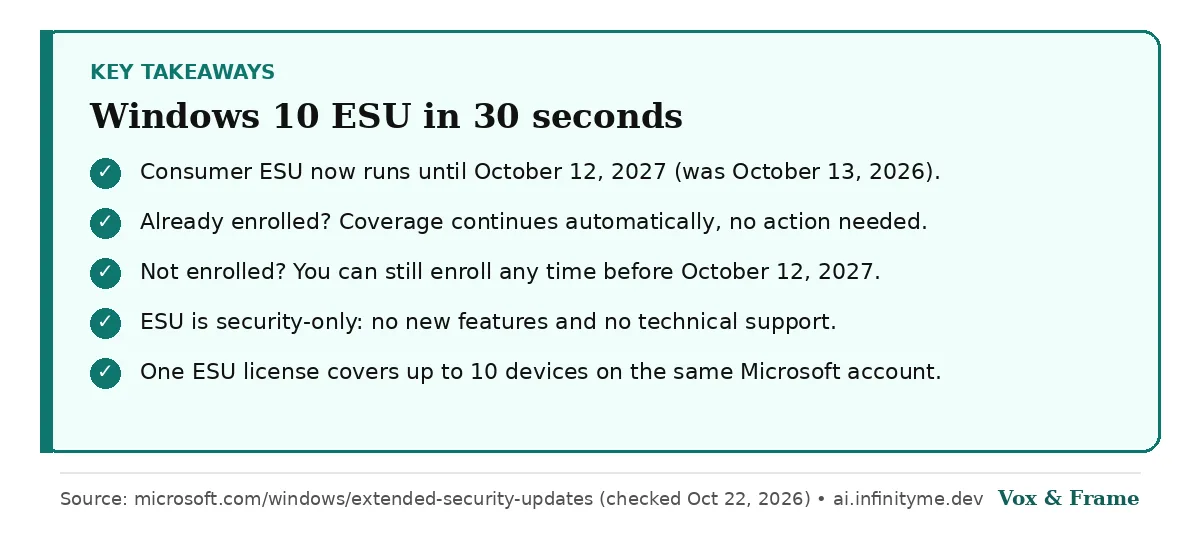
Microsoft's own ESU page now says you can "enroll in ESU any time until the program ends on October 12, 2027", and that existing enrollees' coverage "will automatically continue through that date" (Microsoft).
Who qualifies
Per Microsoft and BleepingComputer:
- Your PC must run Windows 10, version 22H2.
- It must be a personal-use device. PCs joined to Active Directory, Microsoft Entra or managed by MDM are not eligible for the consumer program (Entra-registered devices are).
- You sign in with a Microsoft account to enroll.
Businesses use the separate commercial ESU program, which Microsoft's lifecycle FAQ lists in yearly terms, with Year 3 running to October 10, 2028.
How to enroll (and what it costs)
Enrollment happens from Settings > Update & Security > Windows Update on eligible PCs. Microsoft lists three options (source):
| Option | Cost | Notes |
|---|---|---|
| Sync your PC settings | $0 | Uses Windows Backup with your Microsoft account |
| Microsoft Rewards | 1,000 points | Redeemed once |
| One-time purchase | $30 USD + tax | Or local currency equivalent |
One ESU license can be used on up to 10 devices on the same Microsoft account. BleepingComputer also notes that users in the European Economic Area can get ESU free by signing in with a Microsoft account.
Your options now
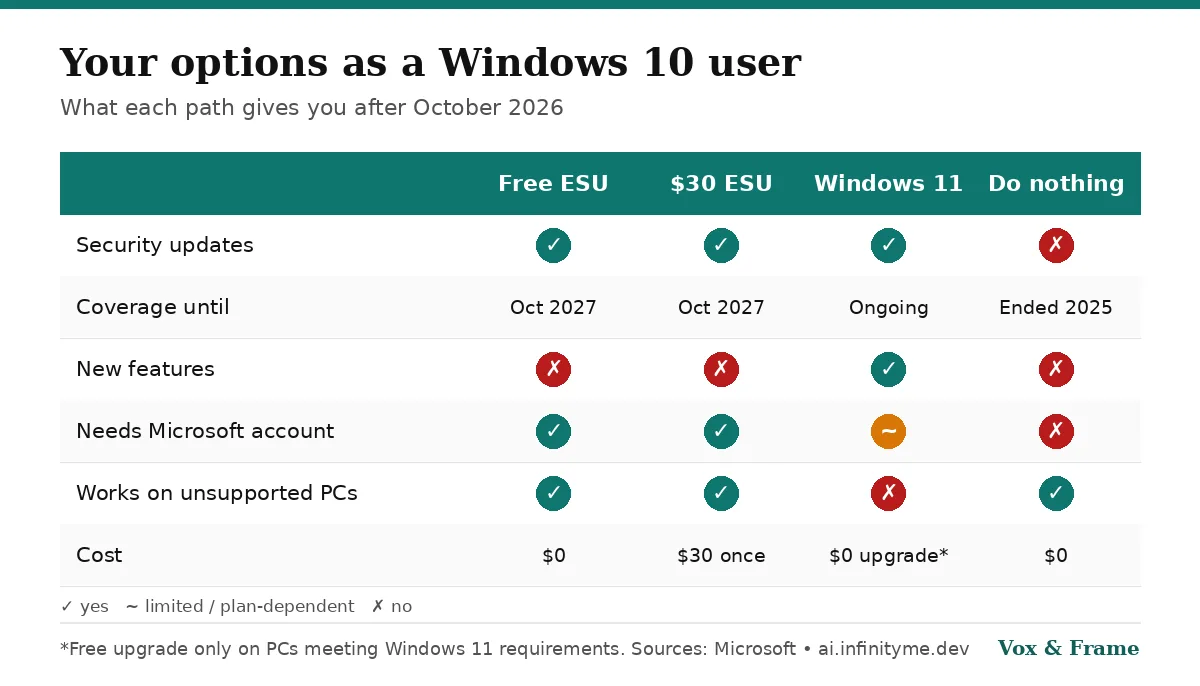
- Stay on Windows 10 with ESU. Best if your PC can't run Windows 11 and still works fine. Remember it is security-only: no new features, no support.
- Upgrade to Windows 11. Free on PCs that meet the Windows 11 requirements, which include TPM 2.0 and UEFI Secure Boot. You can check with the PC Health Check app.
- Replace the PC within the next year, using the extension as breathing room.
- Do nothing. Not recommended: an unpatched, internet-connected PC becomes an easier target for malware over time.
Our take
The extension is good news for anyone with older hardware, but it is a delay, not a reprieve. Enroll now if you haven't (it's free for most people), then use the extra year to plan your move to Windows 11 or a new machine before October 12, 2027.
Sources
- Microsoft: Windows 10 Extended Security Updates (checked October 22, 2026)
- BleepingComputer: Microsoft quietly extends free Windows 10 ESU support to October 2027 (June 25, 2026)
- Microsoft Learn: Lifecycle FAQ – Extended Security Updates
- Microsoft: Windows 11 specifications
Frequently asked questions
When do Windows 10 security updates end now?
+
For personal-use PCs enrolled in the consumer Extended Security Updates (ESU) program, security updates now continue through October 12, 2027, according to Microsoft's ESU page. The original end date was October 13, 2026.
Is Windows 10 ESU free?
+
It can be. Microsoft lists three ways to enroll: at no additional cost if you sync your PC settings to a Microsoft account, by redeeming 1,000 Microsoft Rewards points, or with a one-time purchase of $30 USD (or local equivalent) plus tax.
I already enrolled in ESU. Do I need to do anything?
+
No. Microsoft says existing enrollees automatically remain covered through October 12, 2027.
Does ESU add new features or support?
+
No. ESU delivers only critical and important security updates. It does not include new features, non-security fixes or technical support.